Deprecated: strtr(): Passing null to parameter #1 ($string) of type string is deprecated in /chroot/home/a40b7614/774635bdc8.nxcli.io/html/wp-content/plugins/moosend-email-marketing/vendor/moosend/website-tracking/src/Utils/Encryption.php on line 8 Deprecated: urlencode(): Passing null to parameter #1 ($string) of type string is deprecated in /chroot/home/a40b7614/774635bdc8.nxcli.io/html/wp-content/plugins/moosend-email-marketing/vendor/moosend/website-tracking/src/Payload.php on line 202 Scott Duffy – Page 10 – SoftwareArchitect.ca

Author: Scott Duffy

  • Azure World Newsletter – Issue 2.10

    Azure World Newsletter – Issue 2.10

    June 2, 2021

    Welcome to the tenth edition of the Azure World Newsletter in 2021. 

    Microsoft Build was last week! Did any of the announcements or presentations excite you? I found the announcement of “Windows Package Manager” (winget) interesting, as it finally brings package manager concepts from other systems (npm, pip, and nuget) into Windows as a whole. 

    Here is the Microsoft Build 2021 Book of News, which is a good summary of all of the announcements made: https://news.microsoft.com/build-2021-book-of-news/ 

    Thanks so much for subscribing. As always, if you don’t want to receive this anymore, there’s an unsubscribe link at the bottom. No worries!


    ONE.

    In the last newsletter, I mentioned that Microsoft was shutting down its Blockchain Service relatively soon. Well, now we see why. Azure has introduced a new service called Azure Confidential Ledger which uses blockchain technology.

    It’s being advertised as Tamperproof unstructured data. The Confidential Ledger data store is hosted in trusted execution environments (TEE) and cryptographically hashed to verify its authenticity.

    So in a way, it takes the “tamperproof” benefits of the blockchain but reimagines it as a data storage type in Azure. So you can store something in a database, in a blob, or in a blockchain-backed ledger depending on your security needs.

    https://azure.microsoft.com/en-us/services/azure-confidential-ledger/

    We’re already seeing the first uses of the Confidential Ledger in one of Azure’s own database products – SQL Database Ledger.

    SQL Database Ledger introduces the idea of tamper-proof transactions inside of the traditional database. You can create ledger tables that are “updateable” or “append-only” inside your existing databases. You don’t need to migrate your database or set up a new one to enable this. 

    The idea is that you can detect if data has been edited and restore it back to its original value. Each transaction is cryptographically hashed and stored in a blockchain-type structure – which could be the Confidential Ledger or Azure Immutable Blob storage. 
    https://techcommunity.microsoft.com/t5/azure-sql/announcing-azure-sql-database-ledger/ba-p/2200401


    TWO.

    Microsoft Build was last week, and one of the announcements was around the expansion of the free and low-cost database services.

    Cosmos DB has an expanded free tier, with 1000 RU/s of provisioned throughput (up from 400 RU/s before). It also offers 25 GB of data storage for free now too.

    Azure Database for PostgreSQL and Azure Database for MySQL also got into the mix, with a free 12-month offer. This provides developers up to 750 hours per month free for the first 12 months. (750 hours is all of the hours in a month, so I don’t know why they say it like that.)  

    Azure Database for PostgreSQL – Hyperscale (Citus) basic tier is even available now for a low-cost introduction for Hyperscale on a single node.

    Alongside this announcement, Microsoft is placing all of the Azure Cognitive Services and related AI services into a new category on their site called “Applied AI Services”.  Applied AI services include Azure Bot Services, Azure Cognitive Search, Azure Form Recognizer, Azure Metrics Advisor, and Azure Immersive Reader.

    https://azure.microsoft.com/en-ca/blog/harness-the-power-of-data-and-ai-in-your-applications-with-azure/

    THREE.

    We’ve been making improvements to my course called AI-102 Exam: Designing and Implementing a Microsoft Azure AI Solution.

    You’ll now find a PDF study guide, PDF API reference, and quiz questions inside the course to help you pass this exam.

    If implementing Azure Cognitive Services (now all under Applied AI Services) interests you, and you’re considering the AI-102 exam, please check it out.

    https://www.udemy.com/course/ai102-azure/?couponCode=JUN2021

    The focus of this course is Python because that’s the most common language in the world of machine learning and AI. We’re adding C# examples too this week.


    AZURE PLATFORM UPDATES.

    There were a lot of announcements due to Microsoft Build. The following platform updates happened in the past two weeks: 

    • Azure ExpressRoute – 5 new peering locations available
    • Azure Stack HCI now gives a 60-day free trial
    • Deploy Azure Web Apps to Kubernetes Clusters with Azure Arc (in preview)
    • Expanded Cosmos DB Free tier
    • New Azure Database for PostgreSQL and Azure Database for MySQL free tier offer
    • Cosmos DB Serverless now in general availability
    • Cosmos DB has a Linux emulator for developing and testing locally (in preview)
    • Cosmos DB in-memory cache in preview
    • Cosmos DB RBAC in general availability
    • Always Encrypted for Cosmos DB in preview
    • Encryption at host support in AKS in general availability
    • App Service Managed Certificates now generally available
    • Logic Apps is now a containerized runtime, which can be hosted on top of Functions, App Service Plans, Kubernetes, Docker, or any cloud
    • New Logic Apps features including stateless workflows, and a new designer UI
    • Azure Confidential Ledger in preview
    • IBM WebSphere Application Server on Azure Virtual Machines
    • Red Hat JBoss EAP for Azure Virtual Machines
    • Cosmos DB Partial document update (path-level) in private preview
    • Azure SQL Database Ledger in preview
    • Event Hubs Premium in preview
    • Spot Virtual Machines on Databricks

    Be sure and check out the Azure Updates page if any of these affect you.

    https://azure.microsoft.com/en-us/updates/


    COMING UP FOR ME.

    I’ve been heads down, recording my next course on the SC-900 course. I also have a few surprises planned for the month.


    WHERE TO FIND ME.

    And that’s it for issue 2.10. Thanks for reading this far.

    What is your favorite platform to be on? Perhaps we can connect there.

    Facebook Page: https://www.facebook.com/getcloudskills/ 

    LinkedIn: https://www.linkedin.com/in/scottjduffy/

    Instagram: https://www.instagram.com/getcloudskills.ca/

    Twitter: https://twitter.com/scottjduffy

    Udemy: https://www.udemy.com/user/scottduffy2/

    LinkedIn Learning: https://www.lynda.com/Scott-Duffy/1993589682-1.html

  • Azure Blob Storage – Azure Blob Storage Tutorial – Step by Step

    Azure Blob Storage – Azure Blob Storage Tutorial – Step by Step

    Here’s some brand new content from the SoftwareArchitect.ca YouTube channel that you might find interesting.

    Azure Blob Storage – In this video, I’ll go through the process of creating an Azure Storage Account in Azure. I cover each field of the Azure Blob Storage creation wizard, step-by-step. I explain everything in detail.

    This video is the latest and shows the Azure Portal user interface for creating Azure Storage Accounts.

    Starting from the dashboard of the Azure Portal, I show you how to create Storage Account in Azure. I explain all of the relevant choices along the way. You should be able to follow along with this video and create your own blob storage in Azure very easily.

    Azure Blob Storage – Azure Blob Storage Tutorial – Step by Step

    Or you can see the video directly on YouTube.

  • Creating Virtual Machine In Azure – Azure Virtual Machine Tutorial – Step by Step

    Creating Virtual Machine In Azure – Azure Virtual Machine Tutorial – Step by Step

    Here’s some brand new content from the SoftwareArchitect.ca YouTube channel that you might find interesting.

    In this video, I’ll go through the process of creating a Windows Server 2019 Datacenter virtual machine in Azure. I cover each field of the VM creation wizard, step-by-step. I explain everything in detail.

    This is a follow-up to a video I created in 2019. This video is the latest and shows the Azure Portal user interface for creating Azure VMs.

    Starting from the dashboard of the Azure Portal, I show you how to create a Windows Virtual Machine in Azure. I explain all of the relevant choices along the way. You should be able to follow along with this video and create your own VM in Azure very easily.

    Creating Virtual Machine In Azure – Azure Virtual Machine Tutorial – Step by Step

    Or you can see the video directly on YouTube.

  • Azure World Newsletter – Issue 2.9

    Azure World Newsletter – Issue 2.9

    May 19, 2021

    Welcome to the ninth edition of the Azure World Newsletter in 2021. We’re already well into May, which is hard to believe. Thanks so much for subscribing.

    Have you registered for the Microsoft Build Conference yet? Microsoft Build is coming up May 25-27 and is free to register. It a conference mainly aimed at developers. Check it out, if you are interested. Register here at https://mybuild.microsoft.com/home.

    Now on to the newsletter! As always, if you don’t want to receive this anymore, there’s an unsubscribe link at the bottom. No worries!


    ONE.

    Microsoft is rolling out a new logo for Azure, based on their Fluent Design system.

    On the left is the current logo, while the new logo is on the right.

    From the Microsoft blog post: “It’s part of Microsoft’s Fluent Design System, carefully crafted to produce icons that look familiar to what customers know and love, while representing the agile future of our business.

    I’ve already noticed the new logo in places such as the Mobile App, and so this is already being implemented. The new logo matches the style of some other new Microsoft logos – curved shapes that form a letter.

    https://azure.microsoft.com/en-ca/blog/a-fluent-new-look-for-the-azure-icon/


    TWO.

    Microsoft announced that it’s shutting down its Azure Blockchain Service in September 2021. 

    This immediately caused some confusion as some people seem to associate it with cryptocurrency and Bitcoin. 

    In fact, the Blockchain Service allowed you to use a shared ledger to record and publish a complete transaction history. It’s true that cryptocurrencies use a blockchain to record their transactions, but this service was offering that power to private corporations to use this technology for business purposes.

    Obviously, that did not prove popular enough to keep it going.

    If you’re using Azure Blockchain Service, you’ll need to find an alternative to migrate to. And you only have a few months to do that.
    https://docs.microsoft.com/en-us/azure/blockchain/service/migration-guide

    THREE.

    I’m happy to announce a brand new course on the AI-102 Exam: Designing and Implementing a Microsoft Azure AI Solution.

    The official Microsoft exam objectives say, “Candidates for this exam should be proficient in C#, Python, or JavaScript and should be able to use REST-based APIs and SDKs to build computer vision, natural language processing, knowledge mining, and conversational AI solutions on Azure.”

    And so I designed this course to be really focused on code. There is an official GitHub repository for the course, and I take the time to go through each code sample as it relates to the exam objectives.

    https://bit.ly/3tPGY1i

    The focus of this course is Python because that’s the most common language in the world of machine learning and AI. But if you have programming experience with another language, you should be able to understand what is happening, and it’ll be fun to learn Python.


    AZURE PLATFORM UPDATES.

    The following platform updates happened in the past two weeks: 

    • Azure Backup: Operational backup for Azure Blobs is now generally available
    • Append blobs for Azure Data Lake Storage  is now generally available
    • Prevent shared key authorization for Azure Storage is now generally available
    • Attribute-Based Access Control (ABAC) is now in preview
    • Pricing for Azure Ultra Disks has been reduced
    • ZRS for Azure Managed Disks now in preview
    • Azure Static Web Apps is now generally available
    • Azure Blockchain Service is deprecated as of September 2021

    Be sure and check out the Azure Updates page if any of these affect you.

    https://azure.microsoft.com/en-us/updates/


    COMING UP FOR ME.

    I’ll continue to enjoy the improving weather. I’m going for long walks daily. And I’ll continue to create new courses and content to help students learn Azure.


    WHERE TO FIND ME.

    And that’s it for issue 2.9. Thanks for reading this far.

    What is your favorite platform to be on? Perhaps we can connect there.

    Facebook Page: https://www.facebook.com/getcloudskills/ 

    LinkedIn: https://www.linkedin.com/in/scottjduffy/

    Instagram: https://www.instagram.com/getcloudskills.ca/

    Twitter: https://twitter.com/scottjduffy

    Udemy: https://www.udemy.com/user/scottduffy2/

    LinkedIn Learning: https://www.lynda.com/Scott-Duffy/1993589682-1.html

  • Azure World Newsletter – Issue 2.8

    Azure World Newsletter – Issue 2.8

    May 5, 2021

    Welcome to the eighth edition of the Azure World Newsletter in 2021. Thanks so much for subscribing. 

    The Microsoft Build Conference has been announced for the end of May and is free to sign up. Completely online again, as it was last year. It runs May 25-27 and is aimed at developers. Register here at https://mybuild.microsoft.com/home .

    Now on to the newsletter! As always, if you don’t want to receive this anymore, there’s an unsubscribe link at the bottom. No worries!


    ONE.

    We just passed through the quarterly earnings season, and it seems Microsoft Azure continues to gain market share on Amazon AWS.

    Microsoft reported their Q3 earnings last week, and overall revenue was up 38% year-over-year. Obviously, they’ve benefited from the disruption to offices and traditional work in the past year.

    Azure revenue was listed at being up 50% year-over-year, so that is still quite dynamic growth in that specific segment of their business.

    Of course, Amazon and Google have also reported earnings. We can see the comparison between the cloud earnings of the big players in the chart below.

    Synergy Research Group combed through the latest numbers and put together this graph. 

    Azure and AWS remain the market leaders, Google, Alibaba and some other Chinese cloud players are listed as being strong but small competitors. Which some of the big names in the US technology space such as Oracle, SAP and IBM have only niche offerings.

    Synergy figures that AWS remains the largest cloud provider by revenue in the latest quarter. But Azure continues to grow at a faster pace, as they have over the past several years. 

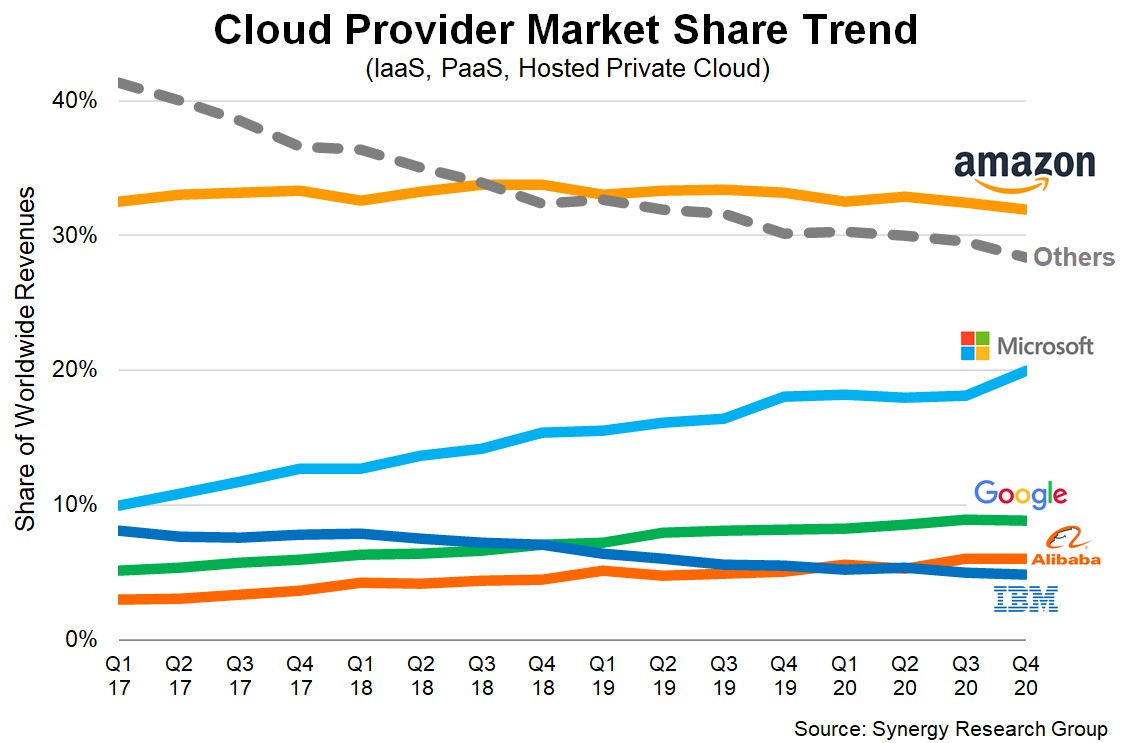
    Another interesting view is showing the change over time.

    The blue Microsoft Azure line has a consistent upward trend from 10% in 2017 to 20% by the end of 2020. While the AWS yellow line has remained flat around 32% over the same period. (If you extrapolate to the future, maybe Azure and AWS will be tied for the lead by 2024?)

    These numbers are just estimates, as the companies don’t reveal the exact numbers, but it’s interesting nonetheless.

    No other major cloud provider is growing as fast as Azure, which bodes well for the future career prospects of those who aim to improve their skills in this area.

    https://www.srgresearch.com/articles/amazon-and-microsoft-maintain-their-grip-market-others-are-also-growing-rapidly

    https://www.srgresearch.com/articles/cloud-market-ends-2020-high-while-microsoft-continues-gain-ground-amazon


    TWO.

    Microsoft has introduced a pretty cool 3D tour of a data center in a presentation called “we live in the cloud”:

    https://news.microsoft.com/stories/microsoft-datacenter-tour/

    They’ve had something like this before, but this is new.

    In this presentation, Microsoft said that they are planning to build 50-100 data centers every year for the foreseeable future. Each region contains at least 3 data centers, so this could be a combination of adding new data centers to existing regions as well as creating new regions.

    They say that they’re planning to add 10 new countries this year.

    There’s even a 3D video presentation to go along with it:

    I recommend both the video and the 3D walkthrough of that data center, to imagine what it’s like to work in the clouds.

    THREE.

    There have been some minor updates to the major Azure exams, with most of them being live on May 25. If you’re studying for these exams, it’s good to know but you should have nothing to worry about.

    AZ-104 – 1 addition: added “administrative units” under Azure AD

    AZ-303 – 3 removals, and 1 addition: Azure AD Connect cloud sync under Hybrid Identities

    AZ-304 – minor cosmetic updates to the objectives, no changes

    DP-100 – lots of changes – added security, dev environment, Databricks, ML Ops Practices, Responsible ML

    AZ-900, AZ-204, DP-900, AI-900 – no updates

    There were also updates on other exams such as AZ-400 and AZ-500. Check the official exam page that relates to the exam you are studying for.


    AZURE PLATFORM UPDATES.

    The following platform updates happened in the past two weeks: 

    • New M-series virtual machines for memory-optimized workloads
    • New D- and E-series virtual machines as well – now up to v5
    • Application Gateway now supports URL Rewrite
    • Ubuntu ended support for 16.04 LTS, and that image has been replaced with 18.04 LTS
    • Azure Event Grid for Azure Redis now in general availability
    • Red Hat Enterprise Linux (RHEL) and SUSE Linux Enterprise Server (SLES) now support Hybrid Benefit for big cost savings
    • Azure Ultra Disk support in North Central US
    • Azure Site Recovery supports cross-continental disaster recovery in 3 regions
    • Azure Site Recovery now supports Azure Policy in public preview
    • Microsoft Azure Web PubSub Service in public preview
    • New Xilinx Alveo U250 FPGA NPv1 virtual machines

    Be sure and check out the Azure Updates page if any of these affect you.

    https://azure.microsoft.com/en-us/updates/


    COMING UP FOR ME.

    Continue to enjoy the improving weather. And continue to create new courses and content to help students learn Azure.

    • I expect my AI-102 course to launch by the time you receive the next newsletter
    • Will go back and address any new videos / lessons based on the exam changes

    WHERE TO FIND ME.

    And that’s it for issue 2.8. Thanks for reading this far.

    What is your favorite platform to be on? Perhaps we can connect there.

    Facebook Page: https://www.facebook.com/getcloudskills/ 

    LinkedIn: https://www.linkedin.com/in/scottjduffy/

    Instagram: https://www.instagram.com/getcloudskills.ca/

    Twitter: https://twitter.com/scottjduffy

    Udemy: https://www.udemy.com/user/scottduffy2/

    LinkedIn Learning: https://www.lynda.com/Scott-Duffy/1993589682-1.html

  • AI-102 Course Preview – Running Cognitive Services on Local Containers

    AI-102 Course Preview – Running Cognitive Services on Local Containers

    Here’s some brand new content from the SoftwareArchitect.ca YouTube channel that you might find interesting.

    Here’s a video I recently recorded for my new AI-102 course that just launched. Click the link for a discount to that brand new course: http://sjd.ca/ai102

    In this video, I discuss how you can use Cognitive Services in your own environment. You avoid having to upload your images, videos, and audios to the cloud for analysis, and do everything locally.

    It’s not free, but it could be faster and provide better privacy for your data.

    AI-102 Course Preview – Running Cognitive Services on Local Containers

    Or you can see the video directly on YouTube.

  • Dale Carnegie, “How to Win Friends and Influence People”

    Dale Carnegie, “How to Win Friends and Influence People”

    In my last post, I mentioned that the key to landing a job once you have the job interview is to make people like you.

    I should have recommended the classic book, “How to Win Friends and Influence People“, by Dale Carnegie.

    It’s a 1936 classic. 85 years old, but much of the advice is still relevant. Again, I consider this a key life skill that will help you succeed in many areas.

    Six Ways to Make People Like You

    1. Become genuinely interested in other people
    2. Smile
    3. A person’s name is the sweetest sound in any language
    4. Be a good listener. Encourage others to talk about themselves.
    5. Talk in terms of the other person’s interests
    6. Make the other person feel important – and do it sincerely

    We’ve all had that conversation where the other person talked only about themselves the entire time. Their problems. Their life. Their issues. And on and on. Those are not great conversations. You do not go away from them happy, and you are often glad it’s over.

    Don’t be that person.

    In the job interview, of course, you want the other person to know you and get a sense of who you are and what you can do.

    But you want to do that in a way that doesn’t make them feel yucky like when you just talked to a self-absorbed friend.

    Ask them how they are doing. Ask them what’s the job like. Ask them what the key to succeed in the job and the company. Listen to the answers. Smile, nod.

    The Best Interviews

    The best job interviews I ever had were ones where everyone was smiling and laughing at the end. Not that it was meant to be a comedy routine, but where the conversation flowed freely and easily. And everyone felt at ease. Where people in the room could see where I’d fit in on the team, and see us all working together.

    Check out that book, if you haven’t. Look for courses on public speaking, and how to talk to strangers if you have anxiety around that.

  • Azure World Newsletter – Issue 2.7

    Azure World Newsletter – Issue 2.7

    April 21, 2021

    Welcome to the seventh edition of the Azure World Newsletter in 2021. Thanks so much for subscribing.

    It’s been fairly quiet in the Microsoft Azure world. I haven’t seen too many announcements from the company. But on the bright side, it’s been a stable couple of weeks on the platform with no high-profile outages. Hopefully, this signals a new period of stability.

    Now on to the newsletter! As always, if you don’t want to receive this anymore, there’s an unsubscribe link at the bottom. No worries!


    ONE.

    Perhaps the biggest announcement of the past couple of weeks is that Microsoft has signed a deal to acquire the company Nuance for $19.7 billion. Now on the surface, this might seem to be an ordinary acquisition. But some people are pointing out that this points to a bigger strategy around AI.

    $19.7 billion is a lot of money. For context, Microsoft paid $26 billion for LinkedIn several years ago, so this acquisition rivals that in size.

    Nuance sells software under the brand Dragon and is popular dictation software in the healthcare space. Their dictation software is the most advanced voice recognition and transcription solution, as they basically invented the technology more than 20 years ago. They’ve been singularly focused on improving dictation since then.

    Nuance’s AI solutions are currently used by more than 55% of physicians and 75% of radiologists in the U.S. and used in 77% of U.S. hospitals. So they absolutely dominate the healthcare space.

    Some see this as a wider move into “enterprise AI”. While other companies focus on the consumer, Microsoft is making plays to be the preferred AI provider in large industries like healthcare.

    https://venturebeat.com/2021/04/17/why-microsofts-new-ai-acquisition-is-a-big-deal/


    TWO.

    The Supreme Court recently delivered a fairly important ruling on copyright relating to the use of Java in the Android Operating System. Android no longer runs on Java, but the ruling is still important to all of us.

    The ruling limits the ability of companies (in this case Java) to demand payment for creating “compatible APIs” even without copying the underlying code.

    This case has been winding its way through the court system for 10 years. In my view, the right decision was finally made.

    The early developers of the Android operating system (first Android Inc and then Google) needed to provide a way for application developers to develop Android apps. They wanted to use Java as the programming language, and they asked Sun Microsystems at the time if they could. Sun apparently set a reasonable fee, but also wanted some form of control over Android along with the deal. They were not able to come to a deal on that.

    So Google decided to create their own virtual machine called Dalvik, which was a clean-room implementation of Java. That is, they developed a compatible version without access to the underlying source code. (Um, mostly. There was one function copied line for line.) This should have meant that they were free of being accused of copying Java.

    It seemed like everyone was happy. Sun congratulated Android and saw this as a victory for the Java ecosystem.

    But a few years later, Oracle acquired Sun and they came with a different perspective. They saw the clean-room implementation as a copyright violation. And they wanted billions in damages.

    Judge William Alsup first took the case in 2010 and became a legend in the process. He taught himself Java and programmed a few things on his own. Thus he decided that some of the copied lines of code were no big deal since even he could write such a basic function. Legend.

    Oracle was basically claiming that the API definition itself was copyrighted. The function names and method signatures. No one could ever create their own “compatible” version of Java if Oracle got its way.

    Luckily, the Supreme Court decided that the interest of progress overrode the interests of a single company trying to prevent progress. Copying API function signatures are fair use.

    https://www.npr.org/2021/04/05/984442325/supreme-court-hands-google-a-win-over-oracle-in-multibillion-dollar-case

    THREE.

    From time to time, students ask me for advice in landing a job.

    Landing a job involves:

    • Developing skills that are in demand in the marketplace
    • Crafting a resume that highlights those in the right way, to get past the first gatekeeper
    • Impressing the person (or people) who makes the hiring decision in an interview

    I put some thoughts together on the last point (interview skills) in a new blog post.

    https://softwarearchitect.ca/job-interview-advice-make-them-love-you/

    It might sound unfair, but you can be highly skilled and still find it hard to find a job. This is because the people who are hiring are often looking for “the right team fit”. Basically, they need to like you after meeting you for the first time. And so, as well as mastering technology skills, you should also work on some social skills that will help you land a job.

    My opinion is that, in general, if people like you after meeting you for the first time, you’ll go farther in life. And if you find it hard to meet new people, and have had the experience of someone not liking you at first but eventually liking you much later, this does not have to be this way. Charisma is a skill that can be learned. And, if you learn it, you can turn it on when you need it like during a job interview.

    Incidentally, having good social skills will help you land jobs even when you don’t have the skillset. I can recall way back in 1995, I landed my very first job as a consultant but did not have direct experience in any of the technology the client was looking for. I learned quickly and did a great job for that client.

    So check out my blog post for some tips on how to make a good impression during a job interview.

    https://softwarearchitect.ca/job-interview-advice-make-them-love-you/


    AZURE PLATFORM UPDATES.

    A very, very quiet couple of weeks in terms of new Azure updates and features, but maybe something important has been announced that affects you.

    • Public preview: Start VM on connect feature for Windows Virtual Desktop
    • Azure Blob storage supports objects up to 200 TB in size
    • Azure Maps Weather Services are now generally available
    • Azure API Management support for Availability Zones now generally available
    • Public preview: Microsoft Build of OpenJDK
    • Cognitive Services – New Computer Vision API v3.2 now generally available
    • Open-source API Portal now generally available

    Be sure and check out the Azure Updates page if any of these affect you.

    https://azure.microsoft.com/en-us/updates/


    COMING UP FOR ME.

    Continue to enjoy the improving weather. And continue to create new courses and content to help students learn Azure.

    • My course for DP-100 Azure Data Scientist has been live for a couple of weeks, and is getting great reviews! There’s still time to pick it up if you’re interested in machine learning in Azure: https://www.udemy.com/course/dp100-azure/?couponCode=APR2021 
    • I had another blog article go live on Udemy’s website. It’s called “How to Pass the AZ-104 Exam”. If you’re interested, here’s the link to that: https://blog.udemy.com/azure-administrator-az-104/ 
    • The next course I am working on, which is turning out great, is AI-102 Designing and Implementing a Microsoft Azure AI Solution. Taking a slightly different approach with this course. It’s going to contain a lot of code and code examples. If you enjoy coding and want to play with Azure Cognitive Services, this course will be right up your alley.

    WHERE TO FIND ME.

    And that’s it for issue 2.7. Thanks for reading this far.

    What is your favorite platform to be on? Perhaps we can connect there.

    Facebook Page: https://www.facebook.com/getcloudskills/ 

    LinkedIn: https://www.linkedin.com/in/scottjduffy/

    Instagram: https://www.instagram.com/getcloudskills.ca/

    Twitter: https://twitter.com/scottjduffy

    Udemy: https://www.udemy.com/user/scottduffy2/

    LinkedIn Learning: https://www.lynda.com/Scott-Duffy/1993589682-1.html

  • Job Interview Advice: Make Them Love You

    Job Interview Advice: Make Them Love You

    Since I became a full-time trainer in 2018, I’ve been fortunate enough to not have to apply for any job in the traditional way.

    But, I’ve always considered myself blessed when it comes to landing the job in any interview I’ve ever had. Right from the early days of graduating from university, I found it relatively easy to walk into the interview and walk out confident that I had “nailed it”.

    After a few years as a developer, I was in a position to make hiring decisions myself. Over my career, I have reviewed hundreds of resumes, interviewed at least 100 people as well (maybe 200 even), and have hired dozens.

    I’ll talk about resume skills for landing a job in another post. I’ll talk about technical skills for landing a job in another post too. This post is about interview skills. This is how you conduct yourself to land the job.

    This is it. Here’s the secret to nailing a job interview:

    You need everyone in the interview to really like you when the interview is over.

    But Scott, It Sounds So Artificial!

    Being likeable does not mean being fake.

    It does you no good to have to put on a fake personality to get the job. So I’m not talking about doing that.

    But what you need to do, is find a way to let your true personality show proudly. If you’re quiet, you can project quiet confidence. If you’re reserved, you can project reserved confidence. If you spend your weekends going to Star Trek conventions dressed as a Klingon, you can find a way to express the geeky side of your personality.

    Don’t be fake. But don’t hide under the interview table either. Even if you really want to. You need to find a “you” that is the one that they want to hire for the job.

    Be Aware of the Energy You’re Projecting

    I’m not talking about crystals or aura here. But you do need to come into the interview with a certain energy and maintain it throughout. To me, this means:

    • Come in happy and excited
    • Dress well and be comfortable in your clothes
    • Greet each person you meet, ask their name, and say their name
    • Have good posture – sit straight
    • Pay attention and demonstrate an interest in the other person
    • Maintain energy and interest throughout the interview, but not too much
    • Be friendly, and put the other person at ease
    • Be able to engage in a bit of small talk – weather, traffic, the office they are in, etc.
    • Be able to read the room – detect what is working and what is not working
    • Every part of your body needs to be in tune with the rest – your words, your face, your body, your hands

    This is so important! Don’t neglect this. You’ll notice that nothing that I said above has to do with technical skills or experience, and some developers might scoff at that. If you believe you are qualified for the jobs you have been applying to, and have been landing interviews, but come away without a job offer – pay special attention to this.

    If you find any of the above to be outside your comfort zone, work on that. Watch videos, or take a class. Get advice from trusted friends who seem to have this figured out. Sign up to Toastmasters if you must.

    But you must find a way to be comfortable in a casual conversation with a stranger.

    Dress for Success

    I am not a fan of suits, but I’ve always had a good suit for job interviews. I never wear a suit to work, but wearing one to the interview is expected.

    Never come to an interview in a t-shirt in shorts. Or sandals. Save that outfit for your second week on the job. You are trying to impress them here.

    Be comfortable in your suit.

    I once interviewed a guy who had a suit on that he was “drowning” in. I am not sure if he borrowed the suit from his dad, or had bought the suit but never wore it. But he did not look comfortable in that suit. It was not impressive.

    He did not get the job – not because of the suit. But it stands out in my mind 10-15 years later.

    If you don’t own a suit, or don’t look good in a suit, find a dressy outfit that you DO look good in. A collared shirt and a tie are fine as long as you don’t sweat through the shirt. And depending on the place, you don’t even need the tie.

    But look at yourself in the mirror, and say “I look good in this.” If you don’t look good, don’t wear it. And again, no t-shirts.

    Find a friend who has great fashion sense and get advice on a good “interview outfit” and use that one for every interview.

    Show Up On Time

    Don’t be late. In fact, aim to be early. You can wait in the car, or in the café down the street until your appointment is almost there. Then you can stroll to the reception right on time.

    Make sure you’re still looking good. Hair combed, clothes all set.

    Another benefit of being early is that you have the chance to set yourself in the right mindset. Get rid of any nerves. Check the job description one more time, and be ready to tell them how great you’d be for this job.

    Be nice to everyone you come across – on the road, in the parking lot, in the reception area. The game starts far outside the building.

    Good Level of Energy

    Then when you meet the person you’re supposed to meet, smile. Be excited to be there, and happy to meet them. Ask them how their day is going. Tell them how nice the lobby is (if it’s nice) or how easy it was to get there. You’re going to have to do a bit of small talk. But the purpose is to establish a quick rapport with the other person.

    Focus on them for a bit. How long have they worked for the company? Demonstrate at least some level of knowledge of what the company does, and why they need you. You researched the company first, right? Good.

    Professional Meeting

    I feel a bit like your mother. “Don’t lean back in the chair. Don’t slump your shoulders. Look at the person who is talking to you. Smile.”

    There has been more than one person that I’ve interviewed over the years who came into the interview like a wet bag of potatoes. They just sat in the chair, with no energy. Not smiling. Their answers were one or two words to each question.

    Why did you waste my time today coming in for this interview if you don’t even look like you WANT to be here?

    Look like you want to be there.

    Use Your Words

    Your parents spent good money sending you to years of elementary and high school. Maybe even college. So, they’ll be very pleased to hear that you can speak in full sentences.

    Answer the questions asked to you. Try to avoid single “yes or no” answers if you can. (Unless the interviewer seems to prefer that.) Look at each question as a brief opportunity to sell yourself. Don’t push that too far, but better to make it seem like you’re the perfect candidate than not.

    Example question: “Have you ever had to use Java in a Windows environment?”

    Example answer: “Great question, John. Back when I was working at Vandelay Industries in 2019, we were moving a Java-based system from one environment to another, and someone had the idea to move from Linux-hosted VMs to Windows. I volunteered to test the system on a Windows environment and report back to the team in the next week. So I set up a Windows system and was able to get a Java environment running. There were a few tricky bits, as you must know, and so I can’t say it was easy but once it worked, it was working. I tested the system, ran our existing unit tests, and everything worked. I reported back to the team, and people were pleased. Several of the other developers believed that it couldn’t be done, but the tests came back all green. We ended up sticking to a Linux environment, but it was an eye-opening experience.”

    So in an answer like that, you aren’t just saying “yes” or “no”, you’re giving some background on your experience. Even though in this example, their experience is only 1 week in a testing environment, it tells the interviewer several other things about you. That you volunteered for the task, that you did what you said you were going to do, and that the rest of the team was impressed with your results. All good traits.

    Almost Never Say No

    Sometimes, an interviewer will ask you a question that you don’t have experience in, yet.

    It’s never good to lie – never. And never good to obfuscate the answer so that the interviewer thinks you said something that you carefully avoided not saying.

    But, when asked if I’ve ever done something, I never just say “no”. I always relate the thing they are asking about to something that I have done.

    Example question: “Have you ever operated in a high-availability environment?”

    Example answer: “In the past 10 years in my career, almost all of the environments I’ve developed for have been important to the companies business. While not true “high-availability” in the dictionary sense, we never want to see production have extended downtime. So there are a number of things we did to ensure that production was protected from downtime. And if they did, that the downtime was brief. I can tell you about them if you’re interested…”

    So you see, in this example, I did not have direct experience with the thing they are asking about. But I demonstrated that I knew what they were talking about, and talked about how the experience I did have was similar to the experience they wanted.

    Read the Room

    One skill that is worth developing, in life, is the ability to read the room. This is the ability to be aware of the feelings of the other people in the room with you, and particularly when those feelings change, and adjust your behaviors to compensate for that.

    One time, I was interviewing for a job with the government. The interviewers must have seen 10-15 candidates for this position, and they were cold as ice. They didn’t smile. They didn’t engage in any small talk. They didn’t make any eye contact at all. They had a series of pre-written questions in front of them, and they were writing down my answers on the form.

    That was my read on the room. I saw them as people who were probably a bit tired of what they were being forced to go through, asking the exact same questions to 10-15 people. And I was coming in late in the day, near the end of their day. Maybe I was even the last interview of the day.

    I tried to be friendly and warm. I tried to make them feel like they could trust me with this position. I would take the job, and they wouldn’t have to worry at all about managing me. Hiring me would make their lives easier.

    I had them smiling at the end. They were more relaxed. The energy that THEY were bringing into the room was HIGHER at the end of the interview.

    Of course, I got the job. When I left the room, I called my agent and told her that I probably got the job. And wasn’t surprised a couple of hours later when they made an offer.

    Conclusion

    Again, none of the above has anything to do with technology. With programming or technical skills. Or, with certification. It has entirely to do with projecting a good image during the interview. It’s about having good, positive energy. Someone that can get the job done. Someone that makes the employer want to hire you on the spot.

    Now if you’re not qualified for the job, your positive energy isn’t going to overcome that. But many companies will hire the right person who can learn the skills over the wrong person who already knows the skills.

    I’ve seen too many low-energy interviewees. Leaning back in the chair. Slumped over. Giving barely audible answers.

    Snap out of it. You want the job! Make them want to hire you!

    If you can’t do that, learn how to do that!

    The skill of being able to talk to strangers and make them like you almost instantly will serve you well throughout your life!

  • Azure World Newsletter – Issue 2.6

    Azure World Newsletter – Issue 2.6

    Welcome to the sixth edition of the Azure World Newsletter in 2021. Thanks so much for subscribing.

    If you don’t mind, I’d like to start off by talking about a personal milestone. In the past few days, the 500,000th unique student has just signed up for one of my courses on Udemy. Since I’m unable to track that person down to thank them individually, I’d like to extend my sincere gratitude to all students in any of my courses.

    I set a personal goal 5 years ago to reach one million students with my training, and I can’t believe I’ve reached the halfway mark already. I’m going to have to set a bigger goal.

    Seriously, thank you to everyone. Including you. Especially you. You’re the best!

    Now on to the newsletter! As always, if you don’t want to receive this anymore, there’s an unsubscribe link at the bottom. No worries!


    ONE.

    Well, this is the second newsletter in a row in which we have to discuss an Azure outage.

    This one was particularly weird. Even the Azure Status page went down (status.azure.com), and a new status page needed to be created (status2.azure.com) to say that the Status page was down.

    It’s not a good sign when your status page needs a status page of its own.

    On April 1, access to Azure websites seemed to be down for about an hour. Not as lengthy as the problem in March. But still unusual.

    The cause of this outage was a DNS problem and it affected the Azure Portal, Microsoft 365, Xbox Live, and some other services. It sounds almost like their DNS system was attacked and, because of a bug in the code, the attack was surprisingly successful. They patched the bug, and that will stop this from happening again.

    I may be reading too much into it. They didn’t specifically call it an attack. Just a surge in “anomalous” DNS traffic.

    https://status.azure.com/en-us/status/history/


    TWO.

    This next article is not specifically Azure-related, but Microsoft recently won a $22 BILLION deal with the US Army for their Hololens Augmented Reality (AR) device.

    This makes total sense. If the device can be reliable in the field, equipping soldiers with devices that can provide various statuses’ on screen in real-time would be a tactical edge. I mean, it’s basically moving closer to a Call of Duty style interface. You know the location of your team, their direction, and distances. You know your heart rate and some other bio stats. Some visual data augments your view so that you can do the job you’re required to do.

    This contract is twice as large as the JEDI contract would have been.

    Obviously, the Hololens is the front-end to a bunch of AI and cloud services in the backend. Good job, Microsoft.

    https://www.forbes.com/sites/moorinsights/2021/04/06/why-microsoft-won-the-22-billion-army-hololens-2-ar-deal/?sh=58a0e6605d43

    THREE.

    If you are a developer, Microsoft has announced its Build 2021 conference for May 25-27. Once again, it will be completely online. And completely free.

    https://arstechnica.com/technopaedia/2021/04/2021-microsoft-build-conference-dates-confirmed-may-25-27/

    Microsoft Build is “where developers, architects, start-ups, and students learn, connect, and code together, sharing knowledge and expanding their skill set, while exploring new ways of innovating for tomorrow.”

    I haven’t seen a good list of the types of topics that will be covered, but clearly, they’re aiming for developers with this content.

    Registration isn’t open yet, but when it is open, it will be on their Build page here:

    https://mybuild.microsoft.com/


    AZURE PLATFORM UPDATES.

    A few new things this week. Nothing too Earth-shattering to me, but maybe something important has been announced that affects you.

    • Backup for Azure Managed Disks
    • Azure Communication Services (video, voice, SMS, chat, and other telephony) is not general availability
    • Encryption scopes (ability to manage encryption keys at the blob or container level) is now generally available
    • AKS node image auto-upgrade now in public preview
    • Insights and workbooks for Cosmos DB in public preview
    • Kubernetes v1.20 support in AKS now available
    • Azure Static Web Apps now integrates with Azure DevOps for deployments in preview
    • Azure Private Link for Redis Cache now available
    • Azure Backup for Azure Dedicated Host now available
    • Azure Monitor for Windows Virtual Desktop now available
    • Azure Cloud Services (extended support) now generally available

    Be sure and check out the Azure Updates page if any of these affect you.

    https://azure.microsoft.com/en-us/updates/


    COMING UP FOR ME.

    Continue to enjoy the improving weather. And continue to create new courses and content to help students learn Azure.

    • My course for DP-100 Azure Data Scientist is LIVE! If you want to get lifetime access to that, here’s a link that you can use for a discount: https://www.udemy.com/course/dp100-azure/?couponCode=APR2021
    • Please share if you know someone that might find it useful.
    • I had another blog article go live on Udemy’s website. It’s called “How to Pass the AZ-104 Exam”. If you’re interested, here’s the link to that: https://blog.udemy.com/azure-administrator-az-104/
    • The next course I am working on, which is turning out great, is AI-102 Designing and Implementing a Microsoft Azure AI Solution. Taking a slightly different approach with this course. It’s going to contain a lot of code and code examples. If you enjoy coding and want to play with Azure Cognitive Services, this course will be right up your alley.

    WHERE TO FIND ME.

    And that’s it for issue 2.6. Thanks for reading this far.

    What is your favorite platform to be on? Perhaps we can connect there.

    Facebook Page: https://www.facebook.com/getcloudskills/ 

    LinkedIn: https://www.linkedin.com/in/scottjduffy/

    Instagram: https://www.instagram.com/getcloudskills.ca/

    Twitter: https://twitter.com/scottjduffy

    Udemy: https://www.udemy.com/user/scottduffy2/

    LinkedIn Learning: https://www.lynda.com/Scott-Duffy/1993589682-1.html